

🧠 What Is RunwayML?
RunwayML (Runway Machine Learning) is an online platform that brings AI models and tools to artists, filmmakers, designers, and creators — all without writing code. Think of it as a creative studio powered by AI engines that help you generate and edit visuals, enhance videos, and build imaginative content faster than ever.
Whether you’re working on:
AI-assisted video editing
Background removal
Style transfer
Text-to-image/video creation
Motion tracking or video effects
RunwayML provides an intuitive interface to do it.
🔍 How Does RunwayML Work?
You don’t need to install complex software or learn advanced programming. RunwayML operates either on the cloud or locally, depending on your workflow.
Here’s how it works:
Choose a Tool/Core Model
Pick from Runway’s library — like video editors, background removal, or generative models.
Upload Media or Enter a Prompt
Add your photos or videos, or describe what you want the AI to generate.
Apply AI Effects and Adjust
Use sliders and settings to alter style, motion, color, background, or structure.
Export or Refine
Save your work as images, videos, GIFs, or advanced formats — ready to publish or refine further.
RunwayML’s interface is visually intuitive, so you instantly see how AI is transforming your content.
🎨 Key Features of RunwayML
4
✨ 1. Gen-2 AI Video Generation
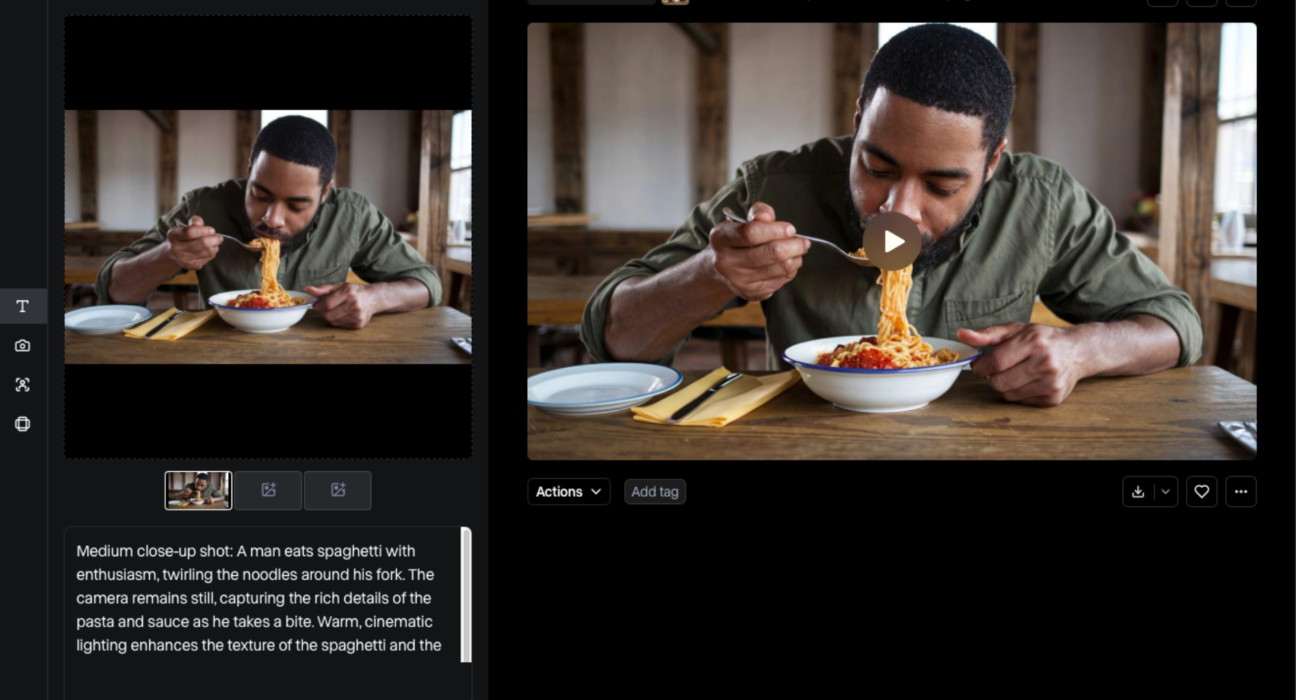
RunwayML’s state-of-the-art AI lets you generate videos from text prompts — a huge leap from still images to motion content using AI.
📌 Example prompt:
“Cinematic sunrise over a neon city, aerial view, animated in dreamy cinematic style.”
🪄 2. Background Removal & Object Isolation
With one click, you can separate subjects from backgrounds — perfect for motion graphics, visual effects, and layering.
🎞️ 3. AI-Assisted Video Editing
RunwayML helps refine footage with:
Motion tracking
Color grading
Frame interpolation
Speed manipulation
Seamless transitions
Even complex edits can be done visually without deep technical expertise.
🧠 4. Creative AI Models
Play with models that let you:
Convert sketches to visuals
Stylize videos like paintings
Replace backgrounds
Animate still images
These tools are usable with sliders, prompts, and preview windows.
🚀 Why Creators Love RunwayML
🛠️ No Code, No Learning Curve
Unlike many tools that require technical skills, RunwayML democratizes creativity — anyone can jump in and create.
🎬 Speed & Efficiency
AI speeds up tasks like rotoscoping, masking, and color correction — often cutting hours of work into minutes.
🌟 Pro-Level Results
Creators get visuals that rival traditional tools but without the steep learning curve.
🤝 Collaborative
Export formats work with Premiere, After Effects, Photoshop, and other industry standards — plug Runway into your current workflow.
🎨 Real-World Uses of RunwayML
Here’s how individuals and professionals are using RunwayML today:
🎬 Filmmakers & Video Editors
RunwayML streamlines editing workflows with AI-powered effects — especially for indie film projects or social content creation.
📸 Photographers & Designers
From stylizing portraits to cleaning backgrounds, designers save time and extend creative options.
🧑🎤 Content Creators & Social Media
TikTokers, YouTubers, and Instagram creators use RunwayML to create eye-catching visuals without outsourcing.
🏢 Agencies & Marketers
Marketing teams produce brand visuals, promotional videos, and stylized graphics faster — making campaign production smoother.
🧠 How to Write Great Prompts in RunwayML
RunwayML’s AI works by understanding language and context. Here’s how to get the best results:
✔ Be descriptive — include subjects, styles, colors, emotions.
✔ Use artistic styles — like “cyberpunk,” “minimalist,” or “watercolor.”
✔ Add context — cinematic mood, camera angles, lighting.
✔ Experiment — try variations with new wording until you get the result you want.
Example Prompt:
“Soft watercolor portrait of a woman in forest light, high detail, vibrant colors, cinematic mood.”
🔧 Tips to Improve Your Workflow
👉 Preview often — Runway allows real-time previews so you can refine each step.
👉 Use layers — isolate elements and recombine creatively.
👉 Combine exports — move outputs into other editors like Premiere for final polish.
🛡️ Ethics & Responsible Use
AI tools like RunwayML raise creative and ethical questions:
Respect copyright: Don’t use AI to mimic or recreate copyrighted characters or styles without permission.
Credit AI where needed: Transparency matters, especially in commercial work.
Avoid harmful content: Use AI to create responsibly and ethically.
AI is a powerful collaborator — and with power comes responsibility.
🌐 The Future of Visual Creation
AI in creative tools is just beginning. With platforms like RunwayML:
Video editing will be faster
Creativity will be more accessible
Collaboration across media will improve
New art forms will emerge
Imagine a world where ideas become visuals instantly — that’s what Runway is building.
🧠 Final Thoughts
RunwayML is more than a tool — it’s a creative playground powered by AI. It brings together artists, filmmakers, designers, and creators of every level, helping them build visuals that were once costly, time-consuming, or technically complex.
Whether you’re an industry pro or simply curious, Runway is a step toward a future where your imagination becomes your canvas — instantly and beautifully.