

📽 What Is InVideo?
InVideo is an AI-enhanced video creation and editing tool designed to help users make professional-looking videos with minimal effort. Whether you’re:
- Creating YouTube content
- Editing marketing ads
- Crafting social media videos
- Publishing educational tutorials
InVideo combines intuitive design, smart automation, and powerful editing features to make video production accessible for everyone—from beginners to seasoned creators.
🎯 Why InVideo Is a Top Pick in 2026
In a landscape filled with video tools, InVideo stands out by blending ease of use, creative flexibility, and powerful AI support:
✨ Intuitive Interface
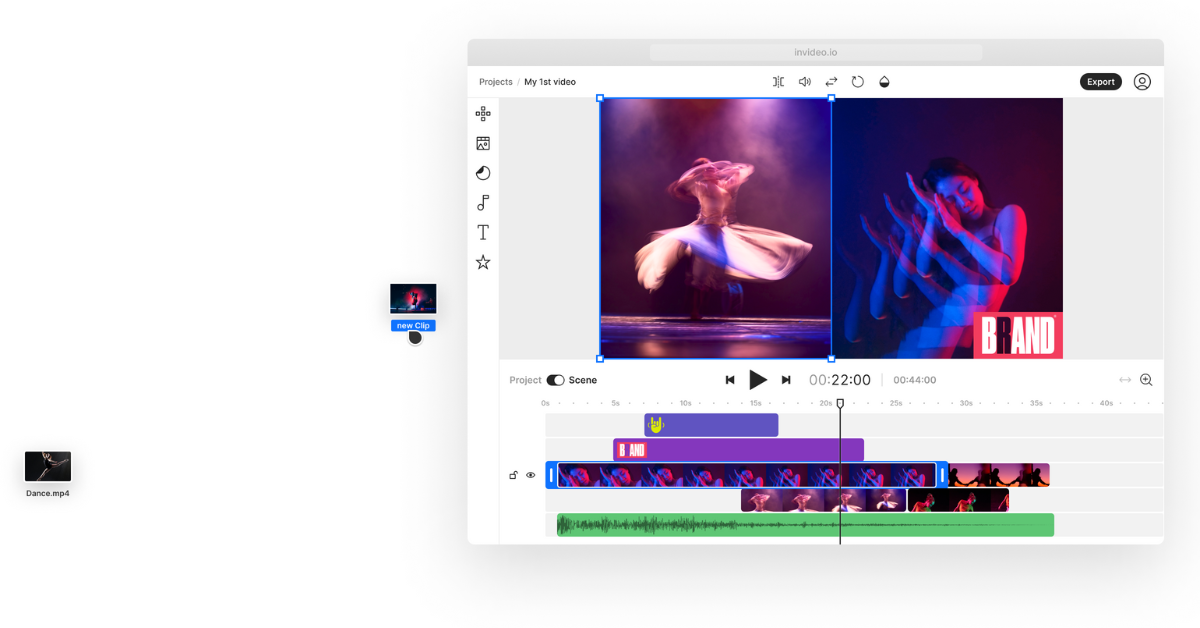
InVideo’s clean, drag-and-drop workspace gets you editing quickly without a steep learning curve.
⚡ AI-Assisted Video Generation
From automated scene suggestions to smart captions and pacing, InVideo speeds up production while sparking new creative ideas.
📈 Built for Marketing & YouTube
Unlike tools focused solely on basic editing, InVideo is engineered to deliver engaging, conversion-friendly videos that perform well on platforms like YouTube, Instagram, TikTok, and LinkedIn.
🔥 Key Features of InVideo (2026)
🧠 AI Video Assistant
The AI helps you:
- Generate video ideas
- Suggest sequences based on script
- Create scene layouts automatically
This is especially helpful when you’re starting with concepts rather than footage.
🎬 Vast Template Library
InVideo’s templates cover:
- YouTube intros & outros
- Product promos
- Explainers
- Ads & social posts
Each template is customizable—so your video feels unique even if you’re using a preset.
📝 Auto-Captions & Subtitles
InVideo automatically generates captions for spoken content—boosting accessibility and watch time, a key YouTube ranking factor.
🎨 Brand Kit & Customization
Store your brand’s:
- Colors
- Logos
- Fonts
So every video stays consistent with your visual identity.
🎶 Royalty-Free Assets
Access audio tracks, sound effects, stock videos, and images without extra licensing headaches—ideal for creators on a budget.
▶️ InVideo for YouTube Creators
YouTube’s competitive environment demands quality and engagement. InVideo delivers tools tailored to creators:
✔ YouTube-Optimized Templates
Craft intros, outros, thumbnails, and transitions that match YouTube best practices.
✔ Storyboarding & Script Sync
Import or write your video script directly and map scenes to text—perfect for talking-head, review, or explainer formats.
✔ SEO-Friendly Captions
Automatically generate subtitles—and export them for YouTube SEO optimization.
✔ Quick Edits for Consistency
Apply brand elements across multiple videos in seconds, saving time on series or episodic content.
📊 InVideo for Marketing Teams
For businesses and agencies, InVideo offers:
📈 Promo & Ad Creation
Generate short, conversion-focused marketing videos for:
- Facebook ads
- Instagram Stories
- LinkedIn campaigns
- TikTok promotions
👥 Collaboration Tools
Team members can:
- Comment
- Review versions
- Approve edits
- Share templates internally
This makes workflow smoother and less chaotic—especially with remote teams.
🆚 InVideo Compared to Other Tools
| Feature | InVideo (2026) | Other Video Tools |
|---|---|---|
| Ease of Use | ⭐⭐⭐⭐⭐ | ⭐⭐⭐⭐ |
| AI Assistance | ⭐⭐⭐⭐ | ⭐⭐⭐ |
| YouTube Focus | ⭐⭐⭐⭐⭐ | ⭐⭐⭐⭐ |
| Template Quality | ⭐⭐⭐⭐⭐ | ⭐⭐⭐⭐ |
| Collaboration | ⭐⭐⭐⭐ | ⭐⭐⭐ |
Bottom Line: InVideo strikes the perfect balance between power and accessibility—especially for creators who want results without complexity.
🎯 Real-World Use Cases
📌 YouTube Tutorials & Reviews
Create polished, brand-consistent videos with dynamic visuals and captions.
📌 Product Promos
Build engaging ad videos in minutes—even without footage.
📌 Social Media Campaigns
Design vertical videos optimized for Instagram Reels, TikTok, and Shorts.
📌 Internal Training Videos
Use voiceovers, scenes, and captions to build clear, instructional content.
💡 Pros & Cons
✔ Pros
- Beginner-friendly and fast
- Strong AI support
- Built-in templates for all major platforms
- Automatic captions and subtitles
- Collaborative teamwork features
✘ Cons
- Lacks advanced cinematic editing for filmmakers
- Some templates can feel familiar if overused
- Exporting very long videos may require premium plans
💰 Pricing & Plans (2026)
InVideo offers a range of plans:
- Free tier – basic editing and limited exports
- Paid plans – unlock:
- High-resolution exports
- Brand kits
- Full template access
- Collaboration tools
For serious creators and marketing teams, premium plans offer great value given the suite of tools included.